Skye vs Routinery: Which Fits Your Everyday Routine?
Skye offers unlimited routines for free. Compare its task timers and controls with Routinery's free routine allowance, spoken guidance, and connected tools.


Choose Skye for unlimited routines, step-by-step timers, pause, skip, and manual time changes, all for free. Keep Routinery on your list if you need spoken next steps or its connected tools.
There is no need to switch merely to avoid a subscription. Routinery currently offers two free routines with ads. If those cover your morning and evening, you may already have a suitable free option.
The useful Skye vs Routinery question is smaller than “Which app wins?” It is: Which functions would this routine lose if I moved it?
What this comparison covers
Skye publishes this guide. External sources were checked October 19, 2026; Skye facts were checked against app source and developer confirmation October 20, 2026. It does not report hands-on app tests, measured time savings, or health outcomes.
Both apps guide timed routines and support task changes during a run. Skye also has optional Auto-next and a setting to hide remaining-time numbers. Those shared functions are not reasons to call either app unique.
Skye vs Routinery: the direct comparison
Mark each difference as required, useful, or not needed. One required spoken cue can matter more than several features you will never use.
| Need | Skye | Routinery |
|---|---|---|
| Custom timed steps | Enter tasks and durations, then follow them in order. | Custom routine steps with individual timers. |
| Change a task's time | Change time before or during a routine; see a running finish-time estimate. | Stretching a running timer described. |
| Pause or skip | Pause, skip, or move a task to the end. | Skipping described; check the exact pause behavior you need. |
| Hear the next task | Written task names; no spoken next-task guidance. | Voice guidance explicitly described. |
| Change the running order | Reorder or add tasks during the current run. | Both described in the timer guide. |
| Wider tools | Optional start reminders, today's task-time summary, and activity streaks. | Mood tracking, routine start links, and AI connections described. |
| Free access | Unlimited routines, all features free, no paywalls. | Two routines with ads; paid access lifts the routine cap. |
Scroll sideways to see all columns.
Sources: Skye support, Skye's developer listing, Routinery's timer guide, features, and current listing.
Skye's controls were checked in app source. Routinery's public descriptions do not answer every control or free-access question. Confirm the functions you rely on before rebuilding a working routine.
When Skye is a reasonable choice
Skye fits a routine you can already describe. You name the tasks, put them in order, and choose a time for each. The app's job is to guide that sequence, not to decide what your morning should contain.
For example, you may know that you want to get dressed, gather bag items, pack, and check your first commitment. If the missing help is a visible current task and an adjustable countdown, Skye's documented controls are relevant.
Skye lets you pause, skip, change time, reorder, or add tasks during the current run. A pause leaves the routine waiting while you handle an interruption. A skip leaves out a step; it does not mean the real task is done. Auto-next is off by default and can be enabled for each task. Support explains the settings.
Choose this smaller role when:
- You are willing to enter your task names and durations manually.
- The task-change controls cover the current run.
- Written task names work for you; you do not need spoken guidance.
- Skye's optional reminder or your existing cue covers the start.
For a Skye start reminder, set a timed routine, enable its reminder, and allow notifications. You can keep an existing cue instead. Check the cue and timing before depending on it for a fixed departure.
See the sequence in Skye.
Select a screen to see the task list, timer, and completion record. These are real app screenshots, not a live routine.
Write your tasks in the order you need them, then set a time for each. Start with a short sequence.
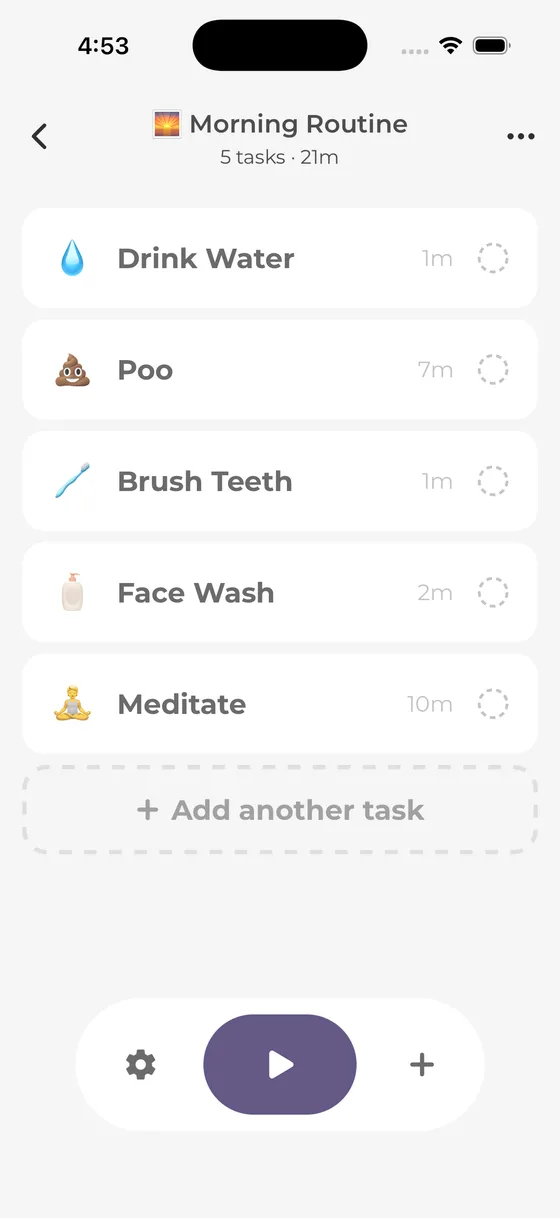
The screens show Skye's task list, current timer, and completion record. They do not demonstrate an import from Routinery or a transfer of history.
When keeping Routinery makes more sense
Routinery's timer guide describes spoken next-task guidance, automatic movement to the next task, live reordering, adding tasks during a run, and hiding remaining time.
Some of those functions are shared with Skye: optional Auto-next, changes during the current run, and hiding remaining-time numbers. Spoken next-task guidance is a real difference. If you need to hear what comes next while putting things away, written task names may not cover that need.
Routinery also describes routine start links and connections to AI assistants on its features page. If those already form part of your setup, account for the work needed to replace them.
Keep it on the required-feature list when you:
- Rely on spoken next steps rather than written task names alone.
- Prefer its particular task-change controls.
- Already have a setup that meets your needs without more manual entry.
- Use its start links or connected tools.
- Rely on its mood tracking or other tools beyond the timer.
The published pages do not map every extra to a free or paid plan. Check the current access terms for your specific feature rather than assume everything on a feature page is free.
Compare the free offers fairly
Routinery's current listing says the free plan includes two routines and shows ads. Paid access lifts that routine cap and removes ads. This is ongoing free access, not merely a trial.
Count the routines you actually need. A weekday morning and an evening preparation sequence could fit within two. Separate workday, weekend, study, and exercise routines may change the cost question.
Skye is free, with unlimited routines and no feature paywalls. You can keep weekday, weekend, study, and exercise routines without paying to save another sequence. Its developer listing also confirms that all features are free.
Do not infer a single paid price from a list of purchase entries. Read the actual offer for the amount, period, renewal, and required features. If Routinery's free plan already meets your needs, moving apps may add setup without removing a current cost.
- Name the needed cueWritten task, spoken next step, or another prompt.
- Check live changesPause, adjust time, skip, or reorder.
- Count real routinesCompare the free offer with what you use.
- Copy one sequenceKeep the original while you check the fit.
A useful result can be keeping Routinery, choosing Skye, or using a paper list.
A switching example: one getting-ready sequence
Use the same self-written steps in both tools. Changing the app and cutting half the routine at once would make it hard to tell which change mattered.
This is an editable example, not a tested best morning or a time limit for personal care:
| Task | Allowance | Check at the end |
|---|---|---|
| Get dressed | 6 minutes | Clothes suit the day's needs. |
| Gather bag items | 4 minutes | The required items are together. |
| Pack the bag | 3 minutes | The items are inside. |
| Check the first commitment | 2 minutes | The next commitment is clear. |
| Collect outerwear and keys | 3 minutes | You are ready at the door. |
Scroll sideways to see all columns.
Add seven spare minutes in this example. Tasks plus spare time total 25 minutes. For an 08:20 departure, begin the task sequence by 07:55. Include unlisted setup separately; it is not inside the 18 task minutes.
The example begins after breakfast and other care needs. Add any unfinished needs to your real plan instead of forcing them into the spare time.
Check the move in five steps
- Write the required functions. For example: visible steps, pause, and time changes. Include voice if you truly need it.
- Keep your original routine. Do not delete a working setup to try another tool.
- Enter this one routine manually. Skye does not import Routinery routines or history.
- Try an ordinary, low-stakes run. Check the next-task cue and a control you naturally need. Do not create a late departure to test an app.
- Count the work outside the app. Note any separate reminder, task detail, or record you had to maintain.
If packing needs longer, revise its allowance and recheck departure time. Neither an adjusted countdown nor a skipped task creates more time before the outside commitment.
Do not assume history, streaks, notes, links, or settings move with the task list. Keep your own summary of anything you need before removing data or changing access.
Check data statements without making a safety ranking
Skye stores routine and task text locally, without cloud sync. App builds with Firebase Analytics enabled send usage events with an app-instance identifier and nontext usage data; events omit routine and task names. Read Skye's privacy policy. Routinery's listing says routine data is stored on its servers and usage analytics use third-party tools.
This comparison of Skye source and product declarations is not an independent network or security test. It does not establish a privacy ranking. Review website data separately, and do not treat local storage as proof of encryption, backup, or recovery.
Keep unnecessary sensitive details out of task names. Check how to retain needed records before deleting data. Skye's streak counts completed or partial sessions on consecutive calendar days, not only scheduled days. A day without a qualifying session breaks that sequence; the count does not measure all your past practice.
Frequently asked questions
How do the free routine limits compare?
Skye has unlimited routines and all features free, with no paywalls. Routinery's listing offers two free routines with ads; paid access lifts its routine cap and removes ads. If two routines already cover your needs, changing apps may add setup rather than remove a cost.
Does Skye read the next task aloud?
No. Skye shows written task names and timers but does not provide spoken next-task guidance. Routinery describes voice guidance. Keep that difference in your decision if you need to follow a routine without reading each next task.
Can I reorder tasks or add one after starting Skye?
Yes. You can reorder or add tasks during the current run, as well as pause, skip, move a task to the end, or change time. Auto-next is optional for each task and off by default. Skye support explains the controls.
Can I import my Routinery history into Skye?
No. Skye does not import Routinery routines or history. Enter task names and durations manually and keep needed old records separately. Copying a task list does not transfer streaks or cancel a subscription.
Keep the functions that matter
Skye offers unlimited free routines, task changes during the current run, optional start reminders, and today's task-time summary. Keep Routinery when you need its spoken guidance or connected tools, or when its two-routine free plan already covers the whole job.
For a wider shortlist, see the Routinery alternatives comparison. If the smaller task-and-timer setup fits, enter one routine in Skye before moving anything else.
Sources and method
External sources checked October 19, 2026. Skye facts checked against app source and developer confirmation October 20, 2026. No hands-on comparison, independent security test, or outcome study was performed. Competitor offers can change.
- Skye support, developer listing, and app privacy policy: setup, controls, free feature access, streak rule, and declared data practices.
- Routinery timer guide and features: spoken cues, running-order changes, start links, and connected tools.
- Routinery developer listing: two free routines with ads, paid access, and declared data practices.
A little space for ideas that fit into real life.
More from the blog